
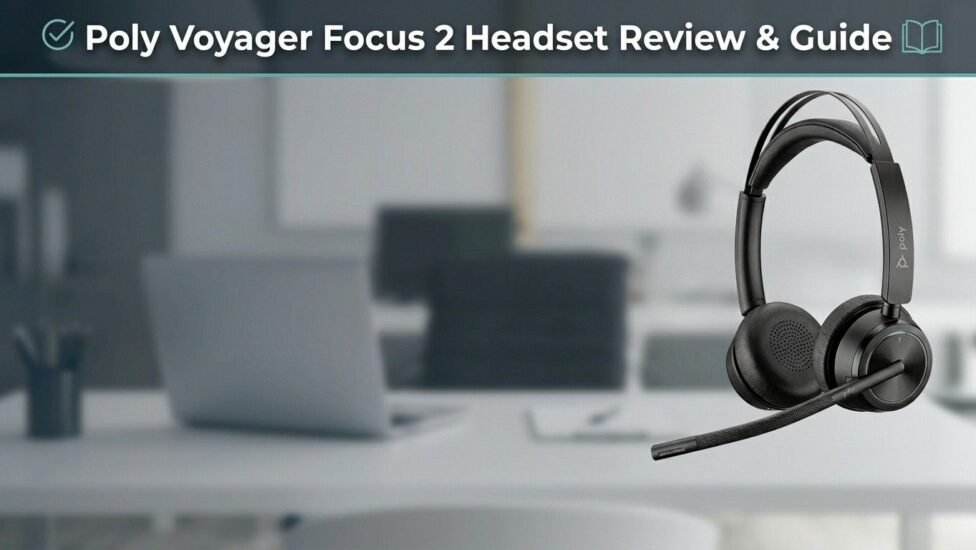
Finding a reliable wireless audio solution for modern remote work and office environments can be challenging. The Poly Voyager Focus 2 headset (originally known under the Plantronics brand) addresses the demands of busy professional spaces through advanced sound engineering and ergonomic comfort. Whether taking calls in a noisy open office or working from home, this UC (Unified Communications) bluetooth device delivers clear audio performance.
Introduction to Poly Voyager Focus 2 Headset
The poly voyager focus 2 headset is engineered for professionals who spend long hours on voice and video calls. Designed with premium materials and adaptive acoustic features, it balances audio quality with user convenience.
Why the Plantronics Voyager Focus 2 UC is Built for Modern Professionals
Modern hybrid work requires tools that eliminate background distractions. The Voyager Focus 2 UC offers strong wireless performance, flexible connectivity across devices, and soft memory-foam ear cushions. It integrates easily into daily routines, making high-volume call schedules manageable and comfortable.
Features & Advanced Audio Technology
The core value of the poly voyager focus 2 headset lies in its active and passive noise management systems.
Poly Voyager Focus 2 Active Noise Cancelling (ANC) Capabilities
Equipped with Digital Hybrid ANC, the headset lets users control their environment. With three distinct active noise cancelling levels (Off, Low, and High), you can adjust background isolation based on your surroundings—from light ambient noise in a quiet study to louder office chatter.
Crystal-Clear Calls with Acoustic Fence Technology
Microphone quality is critical during virtual meetings. The boom arm features acoustic fence technology using multiple microphones to isolate your voice while suppressing background noise. This ensures callers hear only your voice without distracting room background sounds.
Microsoft Teams Certified and Seamless Compatibility
This model is microsoft teams certified, featuring a dedicated hardware button for instant access to Teams channels and meetings. You can explore standard collaboration features on the official Microsoft Teams Portal. It also works seamlessly across Zoom, Cisco Webex, Google Meet, and standard softphone platforms.
Charging Stand & USB-C Adapter Options
The package includes flexible power and connection accessories. Users can choose between standard charging or opting for a version with a desktop charging stand for easy docked storage. Connecting to PC or Mac hardware is simple using the included usb c dongle adapter, ensuring low latency and stable wireless range.
Poly Voyager Focus 2 Specifications & Battery Life
Understanding the hardware details helps determine if this device fits your daily workflow requirements.
| Feature | Details / Specification |
|---|---|
| Model Name | Poly Voyager Focus 2 Headset |
| Connectivity | Bluetooth v5.1, USB-A / USB-C Dongle |
| Wireless Range | Up to 50 meters (164 feet) |
| Noise Cancellation | Digital Hybrid ANC (3 levels) |
| Microphone Tech | Discrete Noise-Canceling Boom with Acoustic Fence |
| Weight | ~175 grams |
All-Day Performance: Real-World Battery Test
A major practical consideration for remote workers is battery life. The headset provides up to 19 hours of talk time (with ANC turned off) and up to 40 hours of listening time. Even with ANC active on the highest setting, it delivers reliable power throughout extended work shifts.
Poly Voyager Focus 2 Bluetooth Connectivity & Range
Powered by Bluetooth technology, the headset maintains stable connections across desktops, laptops, smartphones, and tablets. Multipoint connectivity allows simultaneous pairing to two devices, letting you easily switch between laptop video calls and mobile phone calls. To learn more about short-range wireless communication standards, check the Bluetooth SIG Overview.
How to Connect & Setup Guide
Getting started with your hardware is quick and straightforward. Here is a brief step-by-step guide on how to connect and configure your device:
-
Power On: Slide the power switch on the ear cup to turn the unit on.
-
Pairing Mode: Press and hold the power switch toward the Bluetooth icon until the LED flashes blue and red.
-
Connect to Mobile: Open Bluetooth settings on your mobile device and select the headset from the list.
-
Connect to PC/Mac: Insert the pre-paired USB adapter into your computer’s USB port. The dongle indicator light turns solid blue when connected.
-
Software Configuration: Download the official desktop application to customize EQ settings, adjust side-tone controls, and manage firmware updates.
Model Comparison: Poly Voyager Focus 2 vs Voyager 4320 UC
Choosing between different models depends on your budget and feature requirements:
-
Poly Voyager Focus 2: Features Digital Hybrid ANC with 3 settings, Acoustic Fence microphone technology, plush headband design, and interactive smart sensors.
-
Voyager 4320 UC: Serves as an entry-level to mid-tier UC solution with passive isolation, a single-mic noise reduction design, and a standard headband cushion.
If your primary work environment involves frequent background noise, upgrading to the Focus 2 ANC capabilities is generally recommended.
Buying Guide, Price & Best Deals
When preparing to buy, comparing costs across authorized distributors ensures authentic products and valid warranty support.
Poly Voyager Focus 2 Price in Pakistan and Global Markets
The standard retail price globally ranges between $200 and $290, depending on bundled accessories like desktop stands or USB-A vs USB-C dongles. In pakistan, market pricing typically ranges from PKR 65,000 to PKR 85,000 due to import duties and local vendor availability.
Where to Buy Poly Voyager Focus 2 Online at Best Deals
To find the best deals when shopping online, verify seller authenticity and warranty policies. Official hardware distributors, verified technology retailers, and reputable e-commerce platforms offer legitimate units with full support.
Final Verdict: Is the Poly Voyager Focus 2 UC Worth It?
This comprehensive review shows that the poly voyager focus 2 headset delivers strong performance across call quality, comfort, and noise reduction. For professionals who require clear communication in busy environments, its adaptive ANC, long battery performance, and multi-device pairing make it a practical investment for hybrid productivity.
Frequently Asked Questions (FAQs)
1. Does the Poly Voyager Focus 2 headset have active noise cancellation (ANC)?
Yes, the Poly Voyager Focus 2 headset features Digital Hybrid Active Noise Cancellation (ANC) with three adjustable settings: Off, Low, and High. This allows you to customize noise isolation based on your working environment.
2. How long does the battery last on the Poly Voyager Focus 2?
The headset offers up to 19 hours of talk time (with ANC turned off) and up to 40 hours of listening time. With ANC turned on, talk time ranges between 16 to 18 hours, providing enough power for full workday use.
3. Can I connect the Poly Voyager Focus 2 to two devices at the same time?
Yes, it supports multipoint Bluetooth technology, enabling you to connect to two devices simultaneously (such as your smartphone and laptop) and switch audio seamlessly between them.
4. What is the difference between the Poly Voyager Focus 2 and Voyager 4320 UC?
The Poly Voyager Focus 2 features 3-level active noise cancellation (ANC), smart sensor technology, and dynamic mute alerts. The Voyager 4320 UC is a mid-tier model with passive noise isolation and basic microphone noise reduction without multi-level ANC.
5. How do I put the Poly Voyager Focus 2 into Bluetooth pairing mode?
Slide and hold the power switch toward the Bluetooth icon until the headset LED flashes red and blue. Then open the Bluetooth settings on your smartphone or computer and select the headset to connect.
Related post: Test Microphone Audio Quality Online (No Installation)